

Looks like you don't have ESC button on your device
Download IronCAD DCS
Choose one of the following options
trial versionHas a license

Looks like you don't have ESC button on your device
Choose one of the following options
trial versionHas a licenseSlow adaptation of corrugated cardboard boxes to customer products?
Customize boxes precisely around your customer's product in minutes.
Download trial version of IRONCADBook a demoOver 1000+ satisfied customers



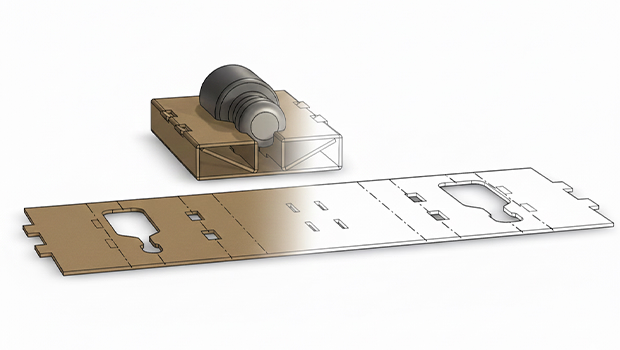
Corrugated cardboard features in 3D
Parameters when needed – not mandatory
DXF export with one click
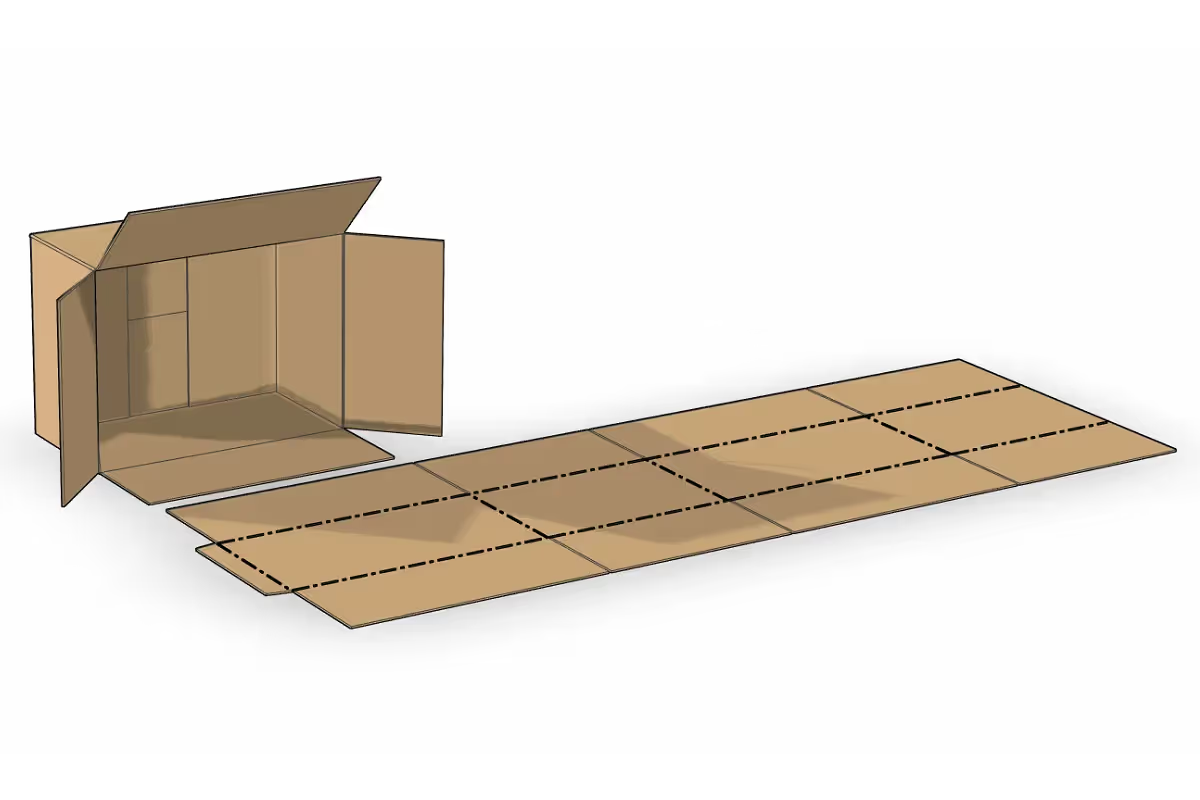
Drag and drop different types of boxes (standard or special) from the side of the screen into the 3D environment. Choose the type of box based on customer requirements and what is to be shipped. Select type of corrugated board (including thickness) from a table. Drag handles directly on the 3D model to adjust the length, width and height of the box, e.g. based on the inside dimensions of the box - done!
Once you have created the customized packaging around the item to be shipped, or the box interior, you can unfold it with one click. Predefined rules for calculating dimensions for folding, cutting and unfolding different materials are included. Different line types contain information on where to cut or fold the corrugated board at specified locations. The unfolded version can be quickly and easily exported to 2D DWG/DXF format for use in production.


IRONCAD can import a wide variety of 3D file formats from customers. Easily place the desired quantity of the product in a corrugated cardboard box. Create the interior and protection of the box directly in 3D, adjusting dimensions by pulling handles and snapping on different geometries (customer model) to efficiently create a suitable support. Start from lots of standardized models that are quickly adjusted and easily unfolded - done!
Here, it's much easier to optimise the solution because you're always working in 3D - that is, exactly as reality looks. The unfolded corrugated board is a direct result of the folded corrugated board model, as it looks when it is finished - not the other way around! This saves a lot of time and money, as it eliminates the need for try-and-error and a lot of waste.
"We have successfully replaced our previous program for creating boxes and furnishings with IRONCAD. It is a much easier and faster way to work directly in 3D, you just see the result in real time. IRONCAD is adapted to handle the special requirements of corrugated cardboard manufacturing and processing.
We often import 3D models that we have received from our customers and can create a suitable packaging in corrugated cardboard around these in a really smooth way, where we can easily see the fit against the parts to be shipped.
We have catalogs with different types of cartons and different interior parts that we easily drag and drop into the 3D environment and pull handles to adjust the dimensions. We can unfold the boxes and fittings to 2D and send them directly to production. The way of working with cardboard and corrugated board in IRONCAD is unbeatable.", says Urban Olars at NEFAB.
Read more about how NEFAB uses IRONCAD

IRONCAD is built for design-intensive industries where you often work with large assemblies, sheet metal, hydraulics, layouts or special machines. You can drag and drop finished components from catalogs, change entire machines in seconds, and switch freely between 2D and 3D environments - perfect for automation, sheet metal bending, construction machinery, hydraulic systems, layout planning, construction forging, and packaging design.
Our basic training is 2 + 2 days (4 days in total). Already after the first two days, most designers are fully productive on basic 3D modeling and assembly. The final two days focus on advanced features, catalog management and your own projects.
Yes - we supply ready-made basic templates and catalogue structures that you can easily customize yourself with your own standard components, beam profiles, hydraulic hoses, sheet metal parts or packaging standards. It only takes a few minutes to fill up with your items and you save a lot of time in the future.
Absolutely. With our Translator, you can open, edit and save files from other CAD systems without losing geometry.
Extremely powerful. You can manage tens of thousands of parts in the same file, move entire machines or factory layouts with a single click and see everything in real time - perfect for layout, construction machinery and automation projects.
Sheet metal bending and layout is included in the basic version of IRONCAD - you get sheet metal layout, bending lines and accurate fabrication data instantly. For construction forging, powerful beam and profile tools and hole tables are included in IC Mechanical.
Yes - all our support and training is in Swedish and we have extensive experience in automation, sheet metal bending, hydraulics, construction and packaging. You get answers quickly.
Of course we do. We always provide a free trial license (30-60 days) with your own drawings and layouts so you can see exactly how much time you save before you decide.
Download a free trial or are you ready for a demo of IRONCAD?
