

Looks like you don't have ESC button on your device
Choose one of the following options
trial versionHas a license

Looks like you don't have ESC button on your device
Choose one of the following options
trial versionHas a license

Emil Rindell

Jonas Bryntesson

Henrik Andersson
2021-05-04
Emil Rindell
Jonas Bryntesson
Henrik Andersson
2021-05-04
A minor update for those who recently updated with PU1 for v2021 has now been released.
OBS! It is best to restart the computer before installation, so that no "part of any previous start" of IRONCAD is left in Windows. This is mainly because the exchange of the Thumbnails.dll file can be stopped during installation.
Click here to download Hotfix 1 for IRONCAD 2021 PU1
Mainly an adjustment around the PDF export from the 2D drawing (ICD) that has gone wrong after the update, where dimensions have been missing due to vectorized handling of the export.
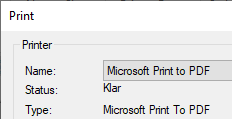
The export to PDF is now based on the Windows built-in Microsoft Print to PDF.
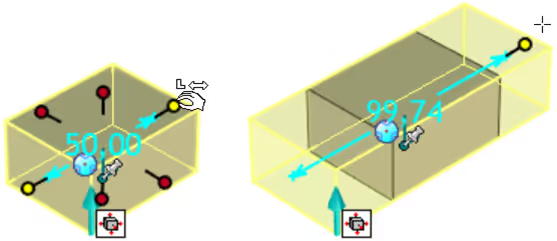
We'd also like to mention a great new feature that came with the PU1 - pull one of the red round Sizebox handles with the right mouse button to get the symmetry effect instantly. Drag with the left mouse button to drag as usual, "non-symmetrically". Remember that you can enter an exact measurement directly when you release the mouse button. Then v2021 follows the measurement box with the position of the mouse pointer on the screen.
There is a new setting under Options, Interaction, to deselect objects in the 3D scene via the [Esc] key, just like in the built-in CAXA Draft 2D CAD.

2D drawings with broken views have had problems with angle and radius measurements, where double digits were displayed. This too is now solved with the hotfix!
In the coming weeks, we are in active dialogue with IronCAD LLC, along with other selected international retailers through something called the Product Steering Committee. There, we will present and discuss possible changes and improvements to the IronCAD Design Collaboration Suite with a focus on version 2022. The DSC currently includes IRONCAD, INOVATE, IRONCAD DRAFT and IRONCAD COMPOSE. But also IronCAD Web Viewer and a brand new exciting product, described as "interactive platform for design collaboration" which still lacks a name. This is of course something we will have the opportunity to come back with more information about!
Take the opportunity to attend our basic training in June, there are still places left! As there are still restrictions and discouragement on travel, we continue to hold our distance learning courses online e.g. via Microsoft Teams.
The upcoming basic training will be held over four days in June, starting on Tuesday 8 June.
Read more about times and course content here

Answer: Here we publish tips, guides, news and solutions for those who work with IRONCAD and Design Data Manager (DDM). The blog covers everything from basic functions to advanced workflows, helping you to optimize your design work. You'll find examples of smart shortcuts, practical instructions, solutions to common problems, and best practices for product design, mechanical design, and product data management.
Answer: Our guides and tips are designed for both beginners and experienced CAD users. They are aimed at designers, engineers and project managers who want to work more efficiently with IRONCAD and DDM, improve the design process, reduce mistakes and save time in product development.
Answer: We regularly publish new articles when the software is updated, when new features are introduced, or when our users ask for solutions to specific problems. The blog is therefore a reliable source for keeping up to date and getting tips that make everyday CAD work easier.
Answer: Many of our instructions and tips work in multiple versions, but we clearly indicate if an article applies to a specific version. We strive to make the content useful for older versions as well, and also provide recommendations on how to adapt workflows to the version you are using.
Answer: Absolutely! If you can't find the solution in the blog, you can contact our technical support via solidmakarna.support. Our experts will help you with everything from installation and configuration to advanced features in IRONCAD and DDM, so you can solve problems quickly and efficiently.
Answer: Yes! We appreciate suggestions from our users. If you have questions, tips or want us to address a specific issue in IRONCAD or DDM , please contact us via our contact form and we will prioritize relevant topics in future posts.
Answer: The blog contains, among other things:
Practical step-by-step guides to help you use IRONCAD and DDM more effectively.
Productivity and workflow tips for faster design and construction.
Solutions to common problems encountered by users in CAD programs.
Updates and news on new features, versions and improvements.
Best practices for data management and project organization in DDM.
Answer: All tips and guides are directly applicable in daily work. For example, you can use shortcuts and smart features in IRONCAD to speed up modeling, structure files better in Design Data Manager, or follow our step-by-step solutions for specific problems that often come up in design projects.
Answer: We strive to ensure that all guides and tips are relevant to the latest versions of IRONCAD and DDM. We also clearly mark when a post applies to an older version, so you always know if the instruction is directly applicable to your system.
Answer: Yes! Many of our users share the articles with colleagues and use them as internal training materials. The blog is a great complement to formal training and helps teams learn features faster, avoid mistakes, and standardize workflows in IRONCAD and DDM.
