Looks like you don't have ESC button on your device
Choose one of the following options
trial versionHas a license

Looks like you don't have ESC button on your device
Choose one of the following options
trial versionHas a licenseIC Mechanical is the toolbox for IRONCAD , offering over 100 features: screws, nuts, bearings, and other standard components in 3D with drag-and-drop functionality.

IC Mechanical offers you over 100 features directly in IRONCAD, developed in collaboration with Solidmakarna for over 15 years based on what Swedish designers actually need. Screws, nuts, washers, lock washers, bearings, springs, and sprockets are dragged into the 3D scene from the catalogs, position themselves correctly, and automatically calculate the correct length. Many of the components comply with Swedish standards, and their designations are automatically transferred to the bill of materials in the drawing.
The video demonstrates the workflow in IC Mechanical: beams and profiles are dragged in from the library and aligned with a single click; stairs and handrails are generated automatically; bolted connections, pipes, and gears are retrieved from the catalogs; and when the model is complete, ProActive Manager generates the bill of materials while the drawing fills in automatically. All of this is included in IronCAD DCS and in your support agreement, at no extra cost.
IC Mechanical offers a range of simple yet powerful tools for designing with steel beams. It includes a large library of standard dimensions. Create your own profiles if desired. Drag and drop beams and align them with a single click. Copy or move them in a matter of seconds using the TriBall tool.
IC Mechanical includes a large library of customizable fasteners and advanced tools for managing them. For example, to create holes through multiple parts simultaneously for bolted joints. Designations according to Swedish standards are created automatically and transferred to the bill of materials in the 2D drawing. These can, of course, also be customized to match your company’s specific numbering system and designations. Summarizing the total number of components in a machine—sorted by dimension or in any other way you choose—is done with the push of a button.
IC Mechanical includes a wide range of tools for creating 3D piping layouts. It comes with a customizable library of pipes and various flange types.
Drag "Steel Stairs" onto the scene and specify the length and height; this will generate a complete staircase with stringers from the steel library, treads with the correct rise, and a landing. Custom stringers, treads, and handrails are saved in the library and adapt to the dimensions.

Check out and learn more about all the features of IC Mechanical in a comprehensive online manual. It includes an overview of all the tools and features with text, images, and videos. There’s an incredible amount of content included!
The development of IC Mechanical is taking place in parallel with IRONCAD and is largely driven by requests from existing users. Stay up to date on all the latest features at IC Mechanical.
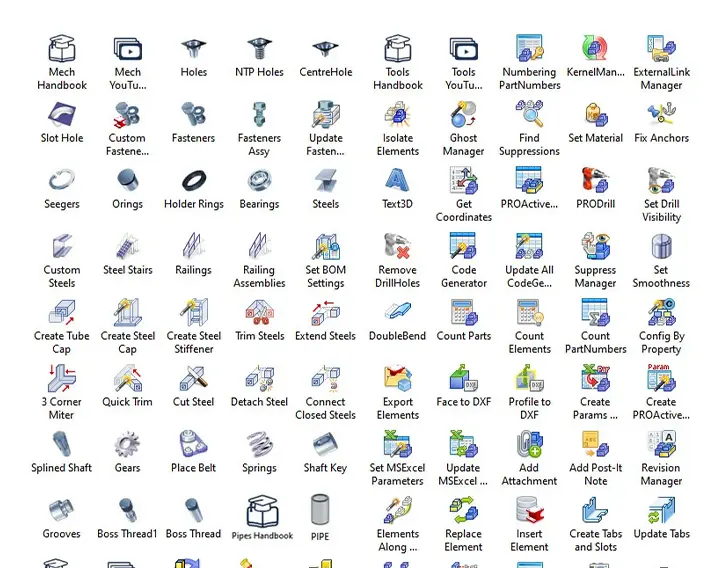

IC Mechanical, formerly IronPRO XT, is a toolbox for IRONCAD with over 100 features: standard components such as screws, nuts, washers, lock washers, O-rings, bearings, springs, sprockets, steel beams, and aluminum profiles, as well as tools for bills of materials, drawings, and exporting.
Yes. Solidmakarna For over 15 years, we have been deeply involved in the development of IC Mechanical, and as a result, many standard components comply with Swedish standards. Designations are created automatically and transferred to the bill of materials in the 2D drawing, and can be customized to fit your own numbering system.
A large library of standard dimensions is included, and you can create your own profiles. Beams can be dragged and dropped into the 3D view, aligned with each other with a single click, and copied or moved using TriBall. There are also tools for steel staircases and handrails.
Yes. IC Mechanical includes a wide range of tools for 3D piping design, with a customizable library of pipe and flange types.
Features include ProActiveManager for bills of materials, editable 3D bills of materials that can be exported to many formats, a 2D drawing header editor, unique QR codes for drawings, DXF export directly from surfaces, 3D text, automatic exploded views, revision management, and parameter control via Excel. These features are organized into the ICM Mech, ICM Tools, and ICM Utils catalogs, and a complete online manual is available.
IC Mechanical is included in the installation file for IronCAD DCS and is provided with an active support contract. Development proceeds in parallel with IRONCAD based on user requests, and new features are released on an ongoing basis.